Monday, 28 April 2014

Did you know...?

Did you know…..?

First Class is out the Outlook 0365 is in! 


HWDSB schools have connected to Prodigy, the online math game and kids love it! As an educator you can add questions to game play that are relative to current teachers and the program provides data to help you monitor your class.


Many schools have purchased licences for Raz-Kids or Big Universe which feature online leveled texts and audio books.


Check out your board website for e-Best learning resources and links. 

http://www.hwdsb.on.ca/e-best/home/links-to-evidence/

Do you have a Desire to Learn?  Check out The Hub and D2L and the Commons!

Check out creative online tools such as:

Researching something?


Up for a little math? It never hurts to check out other Boards…or countries…..

And that doesn’t even enter the world of educational 'apps'.

What educational websites have you explored lately?


Web 2.0/Learning 2.0

Understanding Web Tools and their Educational Implications….or at least an attempt

(image) http://blogs.technet.com

The world of technology and the internet is developing so quickly and has become such an integral part of our lives that it is sometimes hard to remember when these did not exist or to acknowledge their many changes and evolutions. Such was the case for me when I was required to look at the differences between Web 1.0 and Web 2.0 tools.  As a society we have become so accustomed to the use of interactive websites that we forget that the internet was originally filled will static sites developed simply to deliver information.  The basic difference between Web 1.0 and Web 2.0 is the transition from a content centred internet to a communication centred internet.  Rather than simply broadcast information, the internet is a forum of interactive exchanges of information.

Internet applications such as social media, multiplayer on-line games and wikis are the new norm of the web as people share, comment and edit information on-line.  No longer just a place simply to deliver and store data, the internet is now a ‘read/write’ environment. Web 2.0 technology is user driven and perpetuated by the communication, creativity and collaboration of its users.

It is predicted that web 3.0 will further enhance the internet experience through the development of “networked resources…accompanied by machine-readable descriptions that add meaning to content, and describe the structure and status of the knowledge of the content.” (Education 2.0? Designing the web for teaching and learning:  Web 2.0 – future issues and technologies by Patrick Carmichael, http://www.tlrp.org/pub/documents/TELcomm.pdf).  This concept of a ‘semantic’ web exists in theory and is still rather too obscure for my limited understanding of the technologies of the internet, so I will focus on what I do understand of the applications of Web 2.0 tools.

The interactive and collaborative aspects of Web 2.0 have provided many opportunities for education, though for many it is a slow process to integrate them into individual programs.  When you look at the basic concepts though, it is hard to deny the implication so how we learn and communicate and the value of bringing the technology into the classroom.  The distinct advantages of Web 2.0 and the related evolution of Learning 2.0 include:

Collaboration: creation, editing and exchange of learning content in online community enabling group learning and new learning contexts

Networking: expansive communication between student and teachers fostering peer learning and reflection

Blended learning and personal learning paths:  alternative opportunities for learning environments, learning plans and promoting life-long learning as individuals are empowered to control their own path

Engagement and motivation: control over space, content and format and innovative learning tools
(Learning 2.0:  The Impact of Web 2.o Innovation of Education and Training in Europe)

Web 2.0 technologies provide active and authentic learning opportunities for students at all levels.  An interactive community of learners, and learning facilitators, can help individuals progress and develop deeper understandings. Social networking has become the major tool in peer communication and links people from all walks of life and parts of the world.  The ability to ‘work together’ regardless of ‘location’ has heightened learning experiences for students around the globe.  Students are able to delve further into areas of interest that are introduced in the academic setting and work with others to solve problems, reflect and connect.  Education, both formal and informal, is enriched by the collaborative nature of Web 2.0 tools.

Leadership in education can/should also evolve with the application of Web 2.0 tools as students, teachers, and administrators work collaboratively to develop new learning pathways.  Interactive documents and social networking sites can activate programming improvements, and needs and issues can be communicated and addressed more effectively.  Transformational leadership with groups of people working alongside each other to develop and initiate protocols will be more effective in this evolving world of education than the top-down, single leader model of the past (present).  It will be imperative that individuals ‘buy in’ and actively participate in the changing system in order for it to progress.  Unfortunately, a great deal of fear and even complacency exists in this profession, and that can derail the efforts being made to keep formal education viable and valuable for the coming generations of learners.

While reading about Web 2.0/Learning 2.0 it became even more apparent that changes are necessary and possible because of developing technologies.  I do not believe formal education will be replaced, but alternatively should be enhanced by personal and web based learning.  Technology needs to be integrated into our learning system as it is reformed to meet the needs of 21st Century learners.  Just like the creative thinkers of math, science and the arts from Classical times, learners and facilitators of education should not rely on proven content, but thrive in the discovery and creation of ideas and concepts and co- construction of new knowledge.


Sunday, 27 April 2014

Using Storybird

Lesson Plans Using Storybird Online

https://storybird.com/teachers/

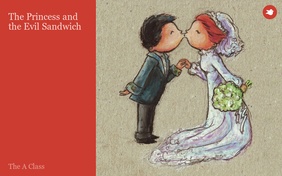
https://storybird.com/books/the-princess-and-the-evil-sandwich/?token=jnpqxpqtqb\
The Princess and the Evil Sandwich

Fairy Tale Unit including: point of view, twisted tales, and elements of the genre.
Reading Expectations:
·         recognize a variety of text forms, text features, and stylistic elements and demonstrate understanding of how they help communicate meaning;
·
·         1.9 identify, initially with support and direction, the speaker and the point of view presented in a text and suggest one or two possible alternative perspectives
·         2.1 identify and describe the characteristics of a few simple text forms, with a focus on literary texts such as a fairy tale
Writing Expectations:
·         generate, gather, and organize ideas and information to write for an intended purpose and audience;
·          draft and revise their writing, using a variety of informational, literary

·         generate ideas about a potential topic, using a variety of strategies and resources

·         identify elements of their writing that need improvement, using feedback from the teacher and peers, with a focus on content and word choice

Media Literacy Expectations:
·         create a variety of media texts for different purposes and audiences, using appropriate forms, conventions, and techniques

·         identify, initially with support and direction, whose point of view (e.g., that of the hero, the villain, the narrator) is presented in a simple media text and suggest how the text might change if a different point of view were used

·         produce media texts for specific purposes and audiences, using a few simple media forms and appropriate conventions and techniques (a story illustrated with diagrams and digital images)


Students are to create their own fairy tale using Storybird on line. The class will create a shared story using the website and LCD in the classroom and then create independent stories during their time in the computer lab.
Storybird provides frameworks/templates for creating stories on line along with an extensive art library to choose from to illustrate the text.  This type of program allows students to choose their artwork prior to writing if they desire, and therefore provides inspiration and assistance in starting stories for hesitant writers.  All creations in the virtual classroom must be reviewed by the teacher before the can be published and viewed by the remainder of the class.  Students can obtain access to their account while at home if they have access to a computer and the internet.
Teacher
·         set up virtual class list in Storybird and print of username/password cards
·         investigation of site features
Introduction of Lessons:
·         Students have been introduced to the genre of Fairy Tales through modelled, shared and independent readings in class.  Discussions have included elements of a fairy tale that are unique to the genre as well as who is telling the story (narrator vs character). 
·         The first period in the computer lab students are introduced to the website Story Bird and given their usernames.  Students are required to set their own password and record it on their username card.  Review the privacy of passwords (keeping it to themselves, other that informing the teacher) and the importance of using a word that is easy for them to remember (so they can have access to the account).  Students are encouraged to explore the site and see what they can learn on their own.  No formal instruction is given at this time as it is preferred that the students see what they can figure out independently.
Continuance of Lessons:
·         The study of Fairy Tales continues with students reading and providing responses to a variety of versions of different Fairy Tales.  Some students are making use of Tumblebooks and ebooks as well as the hard copy texts in the classroom.  This ensures appropriately levelled texts and accessible resources are available to all students.
·         Using the LCD projector and laptop, students view Storybird on the screen/whiteboard.  They are encouraged to lead the lesson by explaining to the teacher and their classmates what they have discovered about the website.  As a group, explore the art gallery.  Discuss how the images chosen will set the mood and tone of the story that will be created.
·         The shared writing will incorporate the three story choses made during the introduction to Fairy Tales from Nelson Literacy.  These include the main character, setting and problem.  Students will pick the set of illustrations they think suit the Nelson choices best and begin to create the Story Bird Fairy Tale as a class.  This will be an interactive lesson where the students will show the teacher how to navigate through the pictures and begin the first page or two of the story. Students will learn/teach how to save the work.
·         Students will use a graphic organizer to brainstorm thoughts about the Fairy Tale they will be independently creating.

Next Computer Lab Session:
·         Before going to the lab, expectations for use of Storybird and the creation of a Fairy Tale will be discussed.  A task assignment will also be available to the students when they log into the site. They will use the picture book format when creating their story.
·         Students are required to create a Fairy Tale that features at least three elements of the genre that have been discussed in class (Examples: appropriate setting, evil character, royalty, the number three or seven, magic, talking animals)  The story must also include a problem and a solution.  It is estimated that the Fairy Tale will take at least 8-10 pages in order to fulfill the expectations.  Students will be given three or four computer lab periods to create, edit, revise and publish their Fairy Tale (timeline will be monitored and adjusted as required).
·         During this period in the lab students will choose the gallery from which they wish to select their illustrations.  Although they could work with a variety of galleries it is preferred they stick to one in order to maintain consistency and limit the time browsing each time they are ready to create a new page.
·         Once they are ready they can begin creating their story using the graphic organizer they worked on in class.
In the classroom:
·         Shared Writing Continued: The class will continue to create the shared Fairy Tale, adding characters, illustrations and creating the problem and solution.  The work will be reviewed and edited as a group.  Discuss how errors are marked with red underlines and the accessible resources for checking spelling as there is not a spell/grammar correct feature on this site.
Back in the lab:
·         Assist students as required as they work independently on their Storybird creation. This is their second full session in the lab so they should be making good progress on their story.  All characters, including the villain, the setting and the problem should be established by the end of this period.
·         Remind students to save and log off at the end of the period (this is Grade Two, and yes they need to be reminded).
In the classroom:
·         Shared Writing Continued: The class will finish creating the shared Fairy Tale making sure there is an appropriate solution to the problem and a proper ending.  The work will be reviewed and edited as a group.  Make any necessary changes.   When the class is happy with the story and believe it is ready to publish and share, discuss the steps required in saving and sharing the story.

      https://storybird.com/books/the-princess-and-the-evil-sandwich/?token=jnpqxpqtqb

      Back in the lab:
·         Assist students as required as they work independently on their Story Bird creation. This is their third full session in the lab so they should be making good progress on their story and hopefully be finished d by the end of this period.
·         Have students have a peer review their Fairy Tale and assist with any revisions. Monitor class progress to decide if another lab period is required for students to complete their Fairy Tales. Remind students to save and log off at the end of the period (this is Grade Two, and yes they need to be reminded).
If another lab period is required for task completion, allow for this, but remind students that it will be the final in school session.  All stories will be saved and sent to the teacher for review.  During the following lab period, students will be reading and reviewing their classmates Fairy Tales and adding appropriate and meaningful comments.  In class, before reviewing stories, discuss with class what an appropriate and meaningful review/comment looks like and create examples.  The online feedback provided by students will also be used as an assessment tool for this activity.

Encourage students to continue using Story Bird as a way to create, experiment and express themselves while at home, or during unstructured classroom or lab  computer use periods.

Checklist
Introduction

3 Fairy Tale Elements


Problem

Solution

Conclusion


Fairy Tale Expectations Rubric


Level  One
Level Two
Level Three
Level Four
Knowledge &
Understanding
Form: includes all required elements of the genre

Ability to make appropriate and meaningful comments on other stories during peer review
Demonstrates limited knowledge and understanding
Demonstrates some knowledge and understanding
Demonstrates considerable knowledge and understanding
Demonstrates thorough knowledge and understanding

Thinking
Use of planner, organization of story (it makes sense  and follows a story path)

Uses planning and organizational skills with limited effectiveness (ideas out of order, jumpy, forgets parts...)
Uses planning and organizational skills with some effectiveness
Uses planning and organizational skills with considerable effectiveness
Uses planning and organizational skills with a high degree of effectiveness
Application
Transfers knowledge of form into his/her own writing using media tool (Storybird Website) to create a Fairy Tale and to review and comment on the stories created by other students
Applies knowledge and skills in familiar contexts with limited effectiveness
Applies knowledge and skills in familiar contexts with some effectiveness
Applies knowledge and skills in familiar contexts with considerable  effectiveness
Applies knowledge and skills in familiar contexts with a high degree of  effectiveness
Communication
Word choice conveys meaning and mood (and connects to graphics)
limited effectiveness
some effectiveness
considerable effectiveness
a high degree of effectiveness


Saturday, 26 April 2014

Social Networking

Social Networking Reflections
How can teachers use/teach social networking tools into the classroom with or without a computer or device?

I’m not sure if the question should be if social networking should be addressed in the classroom, as much as when should it be introduced?  I am currently teaching Grade Two and had to wonder about the concept of social networking for this age group.  Then I thought about how, when and why my students are on the internet. No, they do not have Twitter or Facebook accounts, but their parents are often on these sites and post about their children. The students themselves, however, do often have gaming accounts where they communicate with other players that they might only connected to via the game. They are also involved with sites such as Bitstrips and Prodigy in conjunction with classroom activities. The comments and content on the school related sites is monitored and filtered by the teacher and therefore improper activity can be addressed, but not on the gaming sites. Students need to be educated on the proper use of the internet, terms of use and internet safety as soon as they are deemed old enough by parents or educators to be allowed onto these sites. 

For the age group I teach, the lessons are basic.  We talk about password privacy and why it is important not to share a password with friends.  We also discuss appropriate comments, language, and images that one might use or see on the internet. Students are advised to talk to a trusted adult about things on the internet that concern or upset them just like any other problem they might face. I try to relate ‘virtual’ circumstances to ‘real world’ situations like those students might experience on the playground.  Just like  second and third hand comments at recess, where Jane tells Ann that Sally said she doesn’t like her, but Sally said no such thing, only more damaging, are the comments that someone could post online ‘pretending’ to be you if you give out your password.  Playground bullying is usually more relevant to a seven year old than cyber bullying, but the two can be discussed together when working with young students. I am also trying to pursue networking opportunities with other classrooms, via Skype or blogs. By modelling and sharing as a group online, we will be able to set and share the expectations of safe and appropriate internet networking as a class.

If students are introduced to proper conduct and expectations early in their internet endeavours, hopefully they will retain this knowledge and skill set as more social networking opportunities become available to them in their future.

How can the use of Twitter or other social networking tools help leaders support staff? How is this different from other methods?

I have to be honest; I have never understood the appeal of Twitter.  Maybe it is because all I really knew about it was the misguided or egocentric celebrity tweets that I heard about on the radio or the news.  I have opened my Twitter account and am giving it a try, all in the name of 21st Century Fluencies and expanding my knowledge base, but it will take me awhile to catch on and appreciate its value.

My sons are both big Tumblr advocates. They tell me it is like Twitter but the posts can be longer.  It seems to provide a wealth of information for my sixteen year old….if only he was as interested in things like algebra, biology, or a high school diploma.  ..But I digress.

Facebook has been my social media/medium of choice.  I originally signed on as a way of staying in contact with people I had met in teachers’ college.  My ‘friends’ list mainly consists of actual family members, Mini Aussie owners, and teaching colleagues. As well as keeping in touch on a personal level it a way of sharing experiences and ideas from/for the classroom.

Another aspect of social networking available through Facebook is the groups and ‘likeable’ pages that one can join.  I am currently connected to the Ontario Teachers Resource and Sharing pageI sometimes become frustrated with posts because it seems like some individuals are looking for someone to hand them lesson plans on a silver platter without exerting any personal creative effort. Other times, however, the posts are informative, the questions thought provoking and the links valuable. 

Social networking tools are valuable because they draw in content from a larger variety of sources than the usually staff meetings or even cluster PD sessions. Posts are made by educators who work at all grade levels, have a wide range of experience, are located in various boards and private institutions and maybe most importantly, are part of the conversation on their own time and own initiative. Individuals, even educators, are more receptive to learning when it is on their own terms.


http://thefrailestthing.com/2012/04/10/facebook-as-rear-window-what-hitchcock-and-gadamer-can-teach-us-about-online-profiles/


Fair Use and the Creative Commons

Fair Use of Content and the Creative Commons: Copyright and the Internet

A Creative Commons license is one of several public copyright licenses that enable the free distribution of an otherwise copyrighted work. A CC license is used when an author wants to give people the right to share, use and build upon a work that they have created. ...

We have always been instructed on copyright laws and the necessity of crediting the work and resources we use in both our teaching and our learning, but publishing is no longer confined to bound books or even recordings and videos tapes. Everyday a multitude of images, texts and video are uploading to the internet for millions of people to view, critic, and possibly reuse, repin or repurpose.  It is important that we learn how to not only properly accredit information we glean from the internet, but also to protect what we ourselves are posting on our blogs, websites and social media sites.

As educators we must inform our students about Fair Use of Content and lead by example.  Many school boards purchase licensing agreements and there are a number of ‘free’ sites from which students can pull images.  Just like any resource for an assignment, all information and images retrieved from, or reposted on, the internet should be properly documented according to the attribution or copyright of the site. 

The Creative Commons Attribution Licence has been developed to address the fair use of content on the internet.  Many sites, such as Flickr, make use of Creative Common Attribution, which allows users to decide how others may use their uploaded content.  Just like any copyright law though, there is a level of personal responsibility, ethics and morality that must be in place.  As educators, and leaders in education, it is our responsibility to inform our students and colleagues about fair use policies.  Just like the rules and regulations for photocopying are posted in the mailroom, so should the conventions of the Creative Commons be posted in the computer lab. 


The Six Licences that allow for sharing of content.  Of course, one can also maintain “All rights reserved” to restrict any sharing, revising or reposting of information.

The following italicized infomation has been taken directly from the Creative Commons Attribution Website :  https://creativecommons.org/licenses/

The Creative Commons copyright licenses and tools forge a balance inside the traditional “all rights reserved” setting that copyright law creates. Our tools give everyone from individual creators to large companies and institutions a simple, standardized way to grant copyright permissions to their creative work. The combination of our tools and our users is a vast and growing digital commons, a pool of content that can be copied, distributed, edited, remixed, and built upon, all within the boundaries of copyright law.

The Licenses

Attribution 
CC BY
This license lets others distribute, remix, tweak, and build upon your work, even commercially, as long as they credit you for the original creation. This is the most accommodating of licenses offered. Recommended for maximum dissemination and use of licensed materials.
Attribution-ShareAlike 
CC BY-SA
This license lets others remix, tweak, and build upon your work even for commercial purposes, as long as they credit you and license their new creations under the identical terms. This license is often compared to “copyleft” free and open source software licenses. All new works based on yours will carry the same license, so any derivatives will also allow commercial use. This is the license used by Wikipedia, and is recommended for materials that would benefit from incorporating content from Wikipedia and similarly licensed projects.
Attribution-NoDerivs 
CC BY-ND
This license allows for redistribution, commercial and non-commercial, as long as it is passed along unchanged and in whole, with credit to you.
Attribution-NonCommercial 
CC BY-NC
This license lets others remix, tweak, and build upon your work non-commercially, and although their new works must also acknowledge you and be non-commercial, they don’t have to license their derivative works on the same terms.
Attribution-NonCommercial-ShareAlike 
CC BY-NC-SA
This license lets others remix, tweak, and build upon your work non-commercially, as long as they credit you and license their new creations under the identical terms.
Attribution-NonCommercial-NoDerivs 
CC BY-NC-ND
This license is the most restrictive of our six main licenses, only allowing others to download your works and share them with others as long as they credit you, but they can’t change them in any way or use them commercially.
Of course this also raises the question of posting student work on-line.  Who created the assignment? Who created the finished product? Is it an image of a work or art?  Or set task confined by the parameters of the creator of the task? Are you publishing a student’s text online? Do you need permission to post the work?  If the student is no of the legal age of majority do you have to ask for parental permission to post the work?  Does is matter if it is a completely public site or a post with privacy limitations? What about all those papers parents sign at the beginning of the year concerning internet use and permission to photograph?  Should there be a clause about permission to post student work on line? Is there such a clause included on any of the Board or individual school permission forms already? 

Lots of questions to ponder, and honestly I’m not really sure. For years, teachers have photographed or kept student work to use as examples, and probably with little if any thought to the creative ownership. The internet has opened up the audience of such samples from a few classes of children and some staff members to endless numbers of people. It can depend greatly on the type of site and attribution licence of that site as student work is posted on the web.  We need to educate ourselves not only on the use of copyrighted material from the web, but also on Creative Commons Attribution Licencing concerning what we, and our students/colleagues,  are posting on the internet as well. 


Friday, 25 April 2014

from 66 to 14.... a whole lot of change
21st Century Fluencies

During a workshop presentation of Scientists in the Classroom, I noticed a parent volunteer give me a disapproving look as she observed me using my cell phone.  At the end of the session I took a moment to thank all of the parent volunteers, and also casually mentioned I had earlier been texting the Educational Assistant who works in the class to check on her and the student she had taken on a movement break.  Although we do have walkie talkies that we often use, there are a number in the school on the same channel and classroom students can sometimes overhear conversations.  Using my cell phone was a more private way to communicate with the EA. 
I have had to stop myself from having the same misconceptions and delivering ‘glares’ of my own.  During a case conference meeting I noticed the father of the student being discussed using his Smartphone.  My knee-jerk reaction was “can’t he put that done long enough to discuss his child”, but I took a moment and thought it through.  He was taking notes about the meeting on his phone.
For those of us born prior to the technological revolution, or in the Jurassic Period as my son likes to say, it hasn’t been easy converting, accepting, or at least tolerating, the plugged in lifestyle of our children and students.  As educators though, it is imperative that we not only tolerate, but embrace, the digital world in which we have come to live.
21st Century Fluencies is not entirely about technology, but about the skills to be successful in the world that technology has helped to create.
“The illiterate of the 21st century will not be those who cannot read and write, … but those who cannot learn, unlearn, and relearn.” (Herbert Gerjuoy  as quoted to Alvin Toffler in Future Shock, Bantam:  1970.) It is a quote often cited when discussing education in the digital age, extremely appropriate, and yet I must admit how startled I was by its date of origin.  I thought we were a little slow catching up with the digital wave in educational pedagogy and philosophy, but I didn’t realize how forward thinking some psychologists were back in the seventies. No matter when the quote originated, the point is valid. Being a lifelong learner is not for the theorists or academics, it is a basic skill necessary for survival and success in the 21st century and beyond.
So what are the 21st century fluencies we keep hearing about, and how do we teach our children these skills.  As I understand it, the fluencies are not about what we know, but how we learn it.  Skills such as problem solving, collaboration, communication and analytical and critical thinking should be at the centre of our education.  When I was a student, the focus was on content and certain accepted ways of finding solutions.  We never questioned the lesson or the teacher. In this ever changing world that has been opened up to us through developing technologies, a static education such as the one I grew up with, is of little use to our youth.
As educators, our position has evolved from teacher to facilitator. It is not our job to tell students what to think, or how to think, but to provide opportunities and guidance so that they can develop the skills to critically access data and apply their understanding in a variety of situations.  We truly live in a global community and information is accessible from a myriad of sources at any given time and place.  We need to focus on authentic student engagement and implementing meaningful use of all the data available.  Students should be guided down paths of inquiry that lead to responsible stewardship of the planet as well international and digital citizenship.
Sounds wonderful, relevant and necessary, but how do we manage to teach 21st century fluencies within the parameters of dated curriculum documents and confining ministry expectations. Like with all things in education, it takes balance, flexibility, ingenuity, creativity, and lot of faith in oneself and your students. It takes a little time and willingness to change, but if you reread the curriculum through the lens of a 21st century learner it is more than possible, it can be a whole new adventure.
                                                       
I have heard colleagues say it is too hard to learn about all the new technologies.  They are too old for all that stuff.  These are usually the same colleagues who complain that it is impossible to keep their students engaged in the classroom because they are competing against videos and computer games.  Hmmmm…..
You don’t have to know how to work every gadget or run every program….no one can do that.  What an educator needs is an open mind and to provide enriching and authentic opportunities for their students so they can be creative, critical and learn to solve problems.  Become a member of the digital society and use it to your advantage.  There is a lot available outside of the classroom walls for students and their teachers, and your students can be very good teachers.  This is an opportunity to truly demonstrate and validate the ‘effective learning strategy’ that the best way to learn something is to teach someone else.  I let my students teach me how to use technology all the time, and I teach Grade Two.
Media and social networking are valuable tools for educators.  Although once advised not to use Facebook (yes, we were), individuals can exchange information with educators across the province and around the world instantly through social media.  Collaboration does not have to occur during common prep periods in the room across the hall (though, the face to face is still important), but can occur any time of the day with colleagues from numerous locations.  The use of technology and development of 21st century fluencies as an educator enables an exchange of skillsets and knowledge to encourage further growth and in not only professional pedagogy, but in oneself.
Whether you know how to use all of the functions on your Smartphone or not, you are living in a world/time where/when knowledge is not only at your fingertips, but can be carried around in your back pocket.  As educators it is important to acknowledge this and work with our students to allow them to discover all the learning possibilities that are available to them.  Fostering 21st century fluencies in the classroom will empower students to develop and refine their skills so that they can continue to learn and adapt and be successful members of society.